
Understanding Search Intent: The Key to Better Rankings
You’ve invested in a beautiful website. You’ve written blog posts and meticulously chosen your keywords. Yet, you’re still asking the one question that frustrates so many small business owners: “Why aren’t we on the first page of Google?” The answer often lies in a concept that’s more intuitive than it sounds: search intent.
In today’s competitive digital landscape, simply targeting keywords isn’t enough. You have to understand the “why” behind the search. What is the user actually trying to accomplish? This underlying motivation is called search intent (or user intent), and it’s the single most important element in a modern, effective SEO strategy. Getting it right is the difference between being invisible online and connecting directly with customers who need exactly what you offer.
This article will demystify search intent. We’ll break down what it is, why it’s critical for your business, and how you can harness it to create content that not only ranks higher but also drives meaningful results.
What is Search Intent, and Why Does It Matter for Your Business?
At its core, search intent is the primary goal a user has when they type a query into a search engine like Google. Are they looking for information, trying to find a specific website, or are they ready to make a purchase? Think of it as the difference between someone window shopping and someone walking into your store with their wallet out.
Moving Beyond Just Keywords
In the early days of SEO, success often came down to a numbers game—how many times could you fit a keyword onto a page? This led to low-quality, unhelpful content that was frustrating for users. Thankfully, search engines have become much more sophisticated. Google’s entire business model is built on providing the most relevant, helpful, and satisfying answer to a user’s query.
As Google themselves explain, their goal is to understand the meaning behind the words to return results that truly meet the user’s needs. This means that to rank well, your content must align perfectly with the searcher’s objective. You have to provide the solution they are looking for, not just repeat the words they used to find it.
How Google Prioritizes Search Intent
When you create content that accurately matches a user’s search intent, you send powerful signals to Google. Visitors are more likely to stay on your page longer, engage with your content, and find what they were looking for. These are all indicators of a high-quality user experience, and Google rewards sites that provide it with better visibility.
Ignoring search intent means you’re fighting a losing battle. You might be trying to rank a product page for a keyword where users are clearly seeking informational blog posts. No matter how well-optimized that product page is, it’s unlikely to rank because it doesn’t solve the user’s problem. Aligning with intent is no longer just a good idea; it’s a fundamental requirement of any successful SEO strategy.
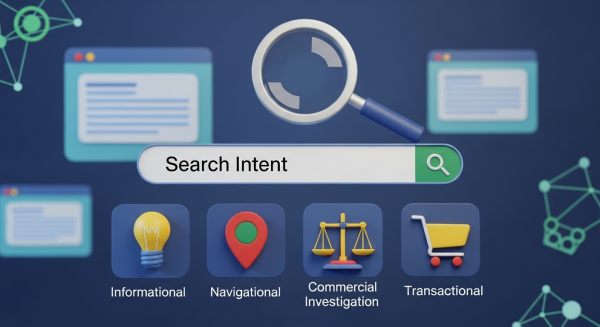
The Four Main Types of Search Intent
To effectively create content, you first need to understand the primary categories of search intent. While there are nuances, most search queries fall into one of four main types. Recognizing them is the first step toward creating a winning content plan.
- Informational: The user wants to learn something.
- Navigational: The user wants to go to a specific website or location.
- Commercial Investigation: The user is considering a purchase and comparing options.
- Transactional: The user wants to buy something or perform a specific action.
1. Informational Intent (“I want to know”)
This is the most common type of search intent. The user has a question and is looking for an answer, a definition, or instructions. Their goal is purely to acquire knowledge. These queries often start with words like “how to,” “what is,” “why,” or “best way to.”
Examples: “how to repot a plant,” “what is a good business credit score,” “local marketing ideas for small business.”
Content to Create: The best way to satisfy informational intent is with high-value, comprehensive content like blog posts, step-by-step guides, how-to videos, detailed articles, and infographics. This content positions you as a trusted expert in your field.
2. Navigational Intent (“I want to go”)
Here, the user already knows where they want to go online and is using the search engine as a shortcut to get there. They are looking for a specific brand, company, or website. They aren’t looking for a type of product; they are looking for a specific provider.
Examples: “Facebook,” “LinkedIn login,” “Your Company Name.”
Content to Create: For navigational intent, the key is to ensure your homepage and major landing pages are optimized for your brand name. Ranking for your own brand should be easy, but a strong website structure and clear navigation are essential for a good user experience once they arrive.
3. Commercial Investigation (“I want to compare”)
This intent sits in the middle ground between research and purchase. The user intends to buy a product or service in the near future but is still in the evaluation phase. They are comparing different options, looking for reviews, and trying to find the best solution for their needs.
Examples: “best CRM for small business,” “Mailchimp vs. Constant Contact,” “iPhone 15 reviews,” “most reliable web hosting.”
Content to Create: To capture this audience, you need content that helps them make a decision. Think detailed product or service comparisons, in-depth reviews, case studies, and “best of” listicles. This is your chance to showcase why your offering is superior to the competition.
4. Transactional Intent (“I want to buy”)
This is the money-maker. The user has made a decision and is ready to take action. Their query is highly specific and often includes words like “buy,” “price,” “coupon,” “for sale,” or “near me.” They are looking for a page where they can complete their desired action immediately.
Examples: “buy running shoes online,” “emergency plumber in Brooklyn,” “web design services quote.”
Content to Create: Transactional intent must be met with product pages, service pages, pricing tables, and sign-up forms. These pages need to be crystal clear, easy to navigate, and designed for conversion. A seamless user experience from a professional website design service is critical to turning this intent into a sale.
How to Identify Search Intent for Your Keywords
So, how do you figure out the intent behind the keywords you want to target? It’s a combination of using common sense and doing a little detective work on the search engine results page (SERP).
Analyze the Keyword Modifiers
The words users add to their core query are huge clues. As we’ve seen, words like “how,” “what,” and “why” signal informational intent, while “buy,” “deal,” and “order” point to transactional intent. Modifiers like “best,” “top,” and “review” almost always indicate a commercial investigation.
Study the Search Engine Results Page (SERP)
The single best way to identify search intent is to Google your target keyword and see what ranks. Google has already done the hard work of figuring out what users want to see. The SERP provides a roadmap for the type of content you need to create.
Ask yourself:
- Are the top results blog posts or product pages?
- Do you see videos or images ranking highly?
- Is there a local map pack, indicating local intent?
- Are there special SERP features like a “People Also Ask” box or a Featured Snippet? These almost always point to informational intent.
By analyzing the top-ranking pages, you get a direct look at the format and style of content that Google believes best satisfies the intent for that query.
Aligning Your Content Strategy with Search Intent
Once you understand the intent behind your target keywords, you can build a content strategy that gives users exactly what they want. This user-centric approach is the foundation of sustainable SEO growth.
Create Content That Provides the Best Answer
Your goal shouldn’t be to just create content; it should be to create the *best* possible resource for a given query. If the intent is informational for “how to fix a leaky faucet,” don’t just write a few paragraphs. Create a comprehensive, step-by-step guide with clear images or even an embedded video. If the intent is transactional, ensure your product page has high-quality photos, detailed descriptions, clear pricing, and a simple, one-click checkout process.
Match the Content Format
Pay close attention to the *type* of content that is ranking. If the SERP is dominated by video results for a particular query, a blog post will struggle to gain traction. If the top results are all “Top 10” listicles, you should probably create your own list-based article. Matching the format that users clearly prefer is a critical step in aligning with their intent.
Build a Comprehensive SEO Funnel
A truly effective content strategy doesn’t just focus on one type of intent. It creates a customer journey. You can attract potential customers at the top of the funnel with helpful informational blog posts. Then, you can guide them toward a decision with commercial investigation content like comparison guides and case studies. Finally, you can convert them with perfectly optimized transactional pages. This holistic approach builds trust and authority at every stage.
By mapping your content to these different stages of intent, you create a powerful funnel that nurtures leads from initial awareness to final purchase. This is a cornerstone of a well-rounded digital marketing plan.
Mastering search intent takes the guesswork out of SEO. It shifts your focus from trying to please a mysterious algorithm to simply helping your potential customers. When you prioritize providing genuine value and answering your audience’s questions, you create a sustainable foundation for long-term growth, higher rankings, and a healthier bottom line.
Ready to turn these insights into a powerful SEO strategy that drives real business growth? Schedule your free, no-obligation consultation with our team and let’s build a smarter, higher-ranking online presence for your business.