
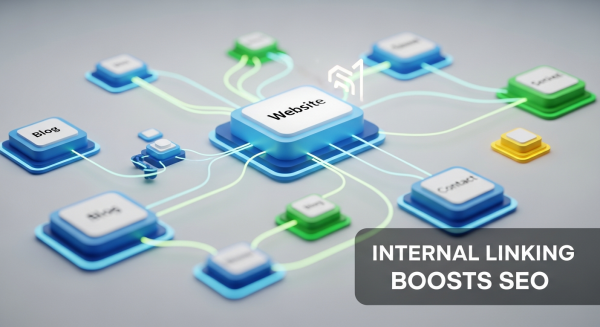
Unlock Your Website’s Full Potential: How Internal Linking Boosts Your SEO
As a small business owner, you know how crucial it is to appear on the first page of Google. You invest time and resources into keywords, content, and maybe even external backlinks. But what if one of the most powerful tools to boost your search engine optimization (SEO) was completely free and entirely within your control? It is. It’s called internal linking, and it’s often the most overlooked element of a successful digital strategy.
Many business owners focus so heavily on getting links from other websites that they forget to build a strong, logical web of links within their own. By simply connecting your pages to one another in a thoughtful way, you can significantly improve your search rankings, enhance user experience, and guide both customers and search engines to your most important content. This article will demystify internal linking and show you how to use it to build a stronger, more authoritative website.
What Exactly Is Internal Linking?
In the simplest terms, an internal link is a hyperlink that points from one page on your website to another page on the same website. If you have a link on your “Services” page that goes to your “Contact Us” page, that’s an internal link. If you have a blog post about “5 Tips for Spring Cleaning” that links to your “Carpet Cleaning Services” page, that’s also an internal link—and a strategic one at that.
A Simple Analogy: Your Website as a City
Think of your website as a city. Each page—your homepage, about page, service pages, and blog posts—is a specific location or landmark. Internal links are the roads, bridges, and highways that connect them. Without these roads, each location is isolated. A visitor (or a search engine crawler) might land in one spot but have no clear path to discover all the other valuable places your city has to offer. A well-planned road system guides traffic efficiently, making it easy for people to find what they need and explore the entire area. Internal linking does the same for your website.
The Key Parts of an Internal Link
Every internal link has two fundamental components that you need to know:
- The URL: This is the web address of the page you are linking to. It’s the destination.
- The Anchor Text: This is the visible, clickable text that the user sees. For example, in the phrase “check out our Website Design Services,” the anchor text is “Website Design Services.” This text is incredibly important because it gives both users and search engines like Google context about what they will find when they click the link.
Using descriptive anchor text is far more effective than using generic phrases like “click here” or “read more.” It’s a direct signal to Google about the topic of the destination page, helping it understand your content more deeply.
Why Internal Linking is a Game-Changer for Your SEO Strategy
A thoughtful internal linking strategy isn’t just a “nice-to-have” feature; it’s a foundational pillar of modern SEO. It directly impacts how search engines see your site and how users interact with it. Here’s how it works its magic.
1. It Helps Search Engines Discover and Understand Your Content
Search engines use automated programs called crawlers (or spiders) to travel the web, discover new pages, and add them to their index—a massive library of all the content they’ve found. These crawlers navigate the internet by following links. When they land on one of your pages, they follow the internal links on that page to find other pages on your site.
If a page has no internal links pointing to it, it becomes an “orphaned page.” It’s like a house with no roads leading to it. A crawler may never find it, which means it will never be indexed and will never show up in search results. A strong internal linking structure ensures that all your valuable pages are connected and easily discoverable by Google.
2. It Distributes “Link Equity” Across Your Site
Link equity, also known as “link juice” or PageRank, is a core concept in SEO. In essence, links pass authority from one page to another. Pages that have a lot of high-quality backlinks from other websites (like your homepage) accumulate more authority. You can strategically use internal links to pass some of that authority from your strong pages to other pages on your site that you want to rank higher.
As explained by Google’s own documentation, PageRank flows through links. By linking from a high-authority page to a newer blog post or an important service page, you’re essentially giving that destination page a vote of confidence. This helps lift the ranking potential of your entire website, creating a “rising tide lifts all boats” effect.
3. It Improves User Experience (UX) and Engagement
SEO isn’t just about pleasing search engines; it’s about providing a great experience for your human visitors. Internal links are critical for this. They act as a navigation aid, guiding users to related information and helping them find the answers they’re looking for. For example, a visitor reading a blog post about “The Benefits of Professional Landscaping” would find it incredibly helpful to see a link to your “Garden Design Services” page within the article.
When users can easily navigate your site and find relevant content, they tend to stay longer. This leads to:
- Lower Bounce Rates: Fewer people leave your site after viewing only one page.
- Higher Pages Per Session: Visitors view more pages during their visit.
- Increased Dwell Time: The total time spent on your site increases.
These are all powerful user engagement signals that tell Google your site is valuable and high-quality, which can lead to better rankings.
4. It Establishes a Clear Website Hierarchy and Topic Authority
A structured internal linking plan helps you establish a clear information hierarchy. One of the most effective methods is the “topic cluster” or “hub-and-spoke” model. This involves creating a main, comprehensive “pillar” page on a broad topic and then creating several “cluster” pages that cover specific sub-topics in more detail.
You then link from the pillar page out to each cluster page, and crucially, each cluster page links back to the main pillar page. This interconnected structure signals to Google that your pillar page is the central authority on that topic. This is a cornerstone of any effective SEO Strategy, as it demonstrates expertise and depth of knowledge, helping you rank for more competitive keywords.
Best Practices for Internal Linking: A Practical Guide
Now that you understand the “why,” let’s focus on the “how.” Implementing an internal linking strategy doesn’t have to be complicated. Here are some actionable best practices you can start using today.
- Link Deeply and Naturally: Don’t just send all your links to your homepage or contact page. Prioritize linking to your most relevant and important service pages, product pages, and blog posts. The link should always make sense in the context of the content and provide real value to the reader.
- Use Descriptive, Keyword-Rich Anchor Text: As mentioned earlier, avoid “click here.” Use anchor text that clearly describes the destination page. If you’re linking to a page about small business accounting services, use anchor text like “accounting services for small businesses” or “learn about our bookkeeping solutions.”
- Create More Content to Link To: A robust internal linking strategy relies on having great content. The more valuable articles, guides, and pages you publish, the more opportunities you’ll have to create a dense, helpful web of links that keeps users engaged and showcases your expertise.
- Don’t Overdo It: While there is no magic number, the key is relevance and user experience. A page cluttered with hundreds of links looks spammy and diminishes the value of each one. Focus on adding links that are genuinely helpful. As a general rule, a few highly relevant links are far more powerful than dozens of mediocre ones. For a deeper dive, Moz offers an excellent guide on internal linking best practices.
- Fix Broken Internal Links: A broken link (one that leads to a 404 error page) is a dead end for both users and search engine crawlers. It creates a poor user experience and wastes any link equity that would have been passed. You can use free tools like Google Search Console to find and fix broken links on your site.
- Audit Your Existing Content: Your work isn’t done once a blog post is published. Set aside time every few months to review older articles. You can often find perfect opportunities to add internal links to newer content you’ve published, helping it get discovered faster.
Getting Started: Your First Steps
Feeling overwhelmed? Don’t be. You can start small and make a big impact.
Step 1: Identify Your “Pillar” Pages
Start by identifying the most important pages on your website. These are typically the core service or product pages that are most critical to your business. They might also be your most comprehensive, “ultimate guide” style blog posts. These are the pages you want to send the most authority to.
Step 2: Find Linking Opportunities
Once you have your list of pillar pages, find other pages on your site that mention relevant keywords. An easy way to do this is with a Google search. Go to Google and type: site:yourdomain.com "your target keyword". This will show you every page on your site that mentions that specific phrase. Go to those pages and add a link back to your pillar page using that keyword as the anchor text.
Internal linking is not a one-time task but an ongoing process. By making it a regular part of your content creation and website management routine, you build a powerful, interconnected digital asset that serves both your customers and your search engine rankings, helping you grow your business for years to come.
If you’re ready to turn these insights into a powerful SEO advantage, our team is here to help. Schedule a free consultation today and let’s build a strategy that gets you noticed.