
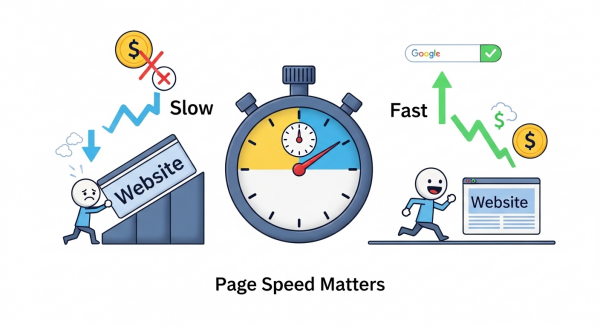
How Page Speed Affects Your Google Rankings (And Your Bottom Line)
In the digital world, speed is everything. Think about the last time you clicked a link and waited… and waited. How long did it take before you gave up and hit the back button? Five seconds? Three? For most people, the patience threshold is incredibly low. That brief moment of frustration is more than just an inconvenience; it’s a critical business problem.
Your website’s loading time, commonly known as page speed, is no longer a minor technical detail. It has become a cornerstone of online success. It directly influences how users perceive your brand, whether they stay to become customers, and, crucially, how Google sees and ranks your site. For a small business, understanding and optimizing page speed isn’t just a good idea—it’s a competitive necessity.
What Is Page Speed and Why Does It Matter?
Page speed measures how quickly the content on one of your web pages loads completely. This isn’t just about how fast your homepage appears; it applies to every single page, from your services list to your blog posts. While a one- or two-second difference might seem trivial, it has a massive impact on user behavior.
A slow website creates a poor user experience (UX). It tells your potential customers that your site is clunky, inefficient, or even untrustworthy. The data backs this up. According to research highlighted by digital marketing expert Neil Patel, even a one-second delay in page response can result in a 7% reduction in conversions. For a small business, that’s a significant amount of lost revenue simply left on the table due to slow performance.
When visitors become frustrated, they leave. This action of visiting a single page and then leaving is called a “bounce.” A high bounce rate signals to search engines that your site isn’t providing the value or experience users are looking for, which can harm your search engine optimization (SEO) efforts.
The Direct Link: Page Speed as a Google Ranking Factor
Google’s primary goal is to provide its users with the most relevant and highest-quality results. A huge part of that quality is the user experience on the destination website. Because of this, Google has officially used site speed as a ranking signal for over a decade. In recent years, they have doubled down on this with the introduction of Core Web Vitals.
Understanding Core Web Vitals
Core Web Vitals are a specific set of metrics that Google uses to measure the real-world user experience of a webpage, focusing on loading, interactivity, and visual stability. Think of them as Google’s official report card for your site’s performance.
While you don’t need to be a developer to understand their importance, knowing what they measure can help you grasp why speed is so critical:
- Largest Contentful Paint (LCP): This measures loading performance. In simple terms, it’s the time it takes for the main, largest piece of content (like a hero image or a block of text) to appear on the screen. A good LCP score reassures the user that the page is actually loading.
- First Input Delay (FID) / Interaction to Next Paint (INP): These measure interactivity. They calculate the time from when a user first interacts with your page (like clicking a button or a link) to when the browser is able to respond to that action. A slow response time here feels like the website is lagging or frozen.
- Cumulative Layout Shift (CLS): This measures visual stability. Have you ever tried to click a button on a page, only for an ad to load suddenly and shift the layout, causing you to click the wrong thing? That’s CLS. It’s a measure of how much your page content unexpectedly moves around as it loads.
Passing the Core Web Vitals assessment, as detailed in Google’s own web.dev resources, sends a strong positive signal to the search engine. It confirms your site provides a smooth and professional experience, which is a key component of a modern SEO strategy.
Beyond Rankings: How Speed Impacts Your Business Goals
Improving your page speed does more than just help you climb Google’s search results. It has a direct and measurable impact on your key business objectives.
Better User Experience and Brand Perception
A fast, responsive website feels modern and professional. It builds trust and confidence in your brand. Conversely, a slow site can make your business seem outdated and unreliable, driving potential customers to your faster competitors before you even have a chance to show them what you offer.
Higher Conversion Rates
This is where performance translates directly into profit. A faster website encourages users to stay longer, view more pages, and, most importantly, take action. Whether your goal is to generate leads, sell products, or book appointments, every second counts. As HubSpot points out, faster pages consistently see better conversion rates because they remove friction from the customer journey.
Improved Mobile Performance
With a majority of web traffic now coming from mobile devices, a fast mobile experience is non-negotiable. Google uses “mobile-first indexing,” meaning it primarily looks at the mobile version of your site for ranking purposes. Since mobile connections can be less reliable than broadband, page speed is even more critical for these users.
Practical Steps to Improve Your Website Speed
Boosting your website’s performance involves a combination of technical optimizations. While some are complex, several fundamental practices can deliver significant improvements. A professional agency focuses on these areas as part of a comprehensive website design and development process.
Here are a few key strategies we implement for our clients:
- Optimize Images: Large, uncompressed images are one of the most common causes of slow websites. Properly formatting and compressing images can drastically reduce page load times without a noticeable loss in quality.
- Leverage Browser Caching: This technique stores parts of your website on a visitor’s device. When they return, their browser doesn’t have to reload everything from scratch, making subsequent visits much faster.
- Minimize Code (CSS, JavaScript, & HTML): Clean, efficient code runs faster. This involves removing unnecessary characters, spaces, and comments from code files to reduce their size.
- Upgrade Your Web Hosting: Cheap, shared hosting can be a major bottleneck. Investing in a quality hosting provider ensures your server has the resources to respond to visitor requests quickly.
- Use a Content Delivery Network (CDN): A CDN is a network of servers distributed around the globe. It stores copies of your site and delivers content to users from a server that is geographically closest to them, significantly speeding up load times.
Implementing these changes can be technical, but tools and platforms are making it easier. Some businesses are even exploring AI automations for small business to help with tasks like image compression and code optimization.
Don’t Let a Slow Website Hold You Back
Your website is often the first interaction a potential customer has with your business. A slow, frustrating experience can also be their last. By prioritizing page speed, you are not just appeasing Google’s algorithm; you are investing in a better experience for your users, building a stronger brand reputation, and creating a more effective engine for growth. In today’s crowded digital marketplace, a fast website isn’t a feature—it’s the foundation of your success.
If you’re ready to enhance your website’s performance and climb the search rankings, our team is here to help. Schedule your free, no-obligation consultation today to discover how we can accelerate your online growth.