
Unlock Higher Rankings: A Small Business Guide to SEO Content Clusters
The End of the Content Treadmill
As a small business owner, you’ve likely heard the mantra: “content is king.” You’ve spent hours brainstorming, writing, and publishing blog posts, hoping each one will be the magic bullet that lands you on the first page of Google. But often, the results are underwhelming. Your articles get a brief spike in traffic and then fade into the digital background, and your search rankings barely move. This is the content treadmill, and it’s exhausting.
The problem isn’t your effort; it’s the strategy. In the past, SEO was a game of targeting individual keywords. You’d write one article for “best coffee grinders” and another for “how to clean a coffee grinder.” Today, search engines like Google are far more sophisticated. They don’t just look for keywords; they look for expertise. They want to reward websites that demonstrate deep, comprehensive knowledge on a particular subject. This is called topical authority, and the single best way to build it is with content clusters.
What Are Content Clusters, Really?
Imagine you want to write a definitive book about digital marketing for your customers. You wouldn’t just write 50 disconnected chapters and toss them in a pile. You’d create a structured book with a table of contents (the main overview) and individual chapters that dive deep into specific subjects like email marketing, social media, and SEO. A content cluster works exactly the same way for your website.
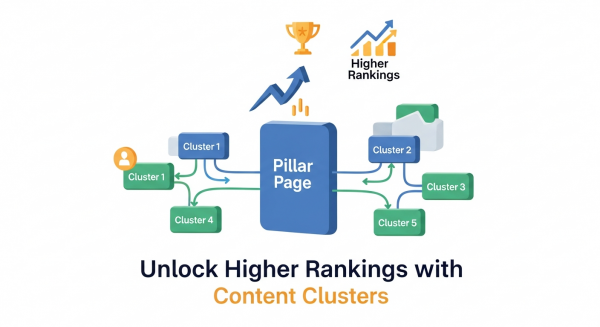
This powerful SEO model organizes your content around central topics, proving your expertise to both search engines and human readers. There are three core components.
The Pillar Page
The pillar page is your “table of contents.” It’s a long, comprehensive piece of content that covers a broad topic from top to bottom. For a landscaping company, a pillar page might be “The Ultimate Guide to Garden Design.” This page touches on all aspects of the topic—planning, soil types, plant selection, hardscaping, etc.—but doesn’t go into exhaustive detail on any single one. Its goal is to be the central hub for that topic on your website.
The Cluster Content
The cluster content pieces are your “chapters.” These are individual blog posts or articles that explore a specific subtopic from your pillar page in great detail. Using the landscaping example, cluster content could include articles like “How to Choose the Right Plants for a Shady Garden,” “5 Low-Maintenance Hardscaping Ideas,” or “A Beginner’s Guide to Soil Testing.” Each of these articles is a deep dive that answers a very specific question related to the main pillar topic.
The Internal Links
Internal links are the glue that holds the entire structure together. This is the most crucial part for SEO. Each piece of cluster content must link back to the main pillar page. In turn, the pillar page should link out to all of its supporting cluster articles. This creates a web of interconnected content that signals a clear relationship to search engines. It tells Google, “Hey, not only did we write about this one specific thing, but we have a whole library of expert content on the broader subject.”
Why Your Small Business Needs a Content Cluster Strategy
Adopting a topic cluster model isn’t just about organizing your blog; it’s a fundamental shift that produces tangible business results. It moves you from shouting random keywords into the void to strategically building a fortress of expertise that search engines and customers will reward.
Build Unshakeable Topical Authority
When you create an interconnected hub of content around a specific subject, you’re not just a site with a blog post; you’re an authority. Search engines are designed to find and promote experts. By thoroughly covering a topic, you signal to Google that you are a credible source of information, making it more likely to rank your pages higher. As experts at Moz explain, this authority is a powerful competitive advantage that is difficult for others to replicate.
Improve Search Engine Rankings for High-Value Keywords
The strategic internal linking within a cluster does more than just organize content; it funnels authority. When one of your cluster articles earns a backlink or gets a lot of traffic, the “ranking power” from that page is shared with the pillar page and other connected articles through the internal links. This rising tide lifts all boats, helping the entire cluster of pages rank higher for a wide range of related keywords, from broad terms to specific long-tail questions.
Enhance User Experience and Engagement
A user who lands on one of your detailed cluster articles can easily navigate to the main pillar page to get a broader overview or click through to other related articles to learn more. This keeps them on your website longer, reducing your bounce rate and increasing pages per session. These are strong positive signals to search engines that users find your site valuable. A seamless user journey is a core component of great Website Design Services and is essential for turning visitors into leads.
Streamline Your Content Creation
Ever sit down to write and draw a complete blank? The content cluster model provides a built-in content calendar. Once you’ve chosen your pillar topic, you can easily generate a dozen or more ideas for cluster articles. This focused approach ensures every piece of content you create has a clear purpose and contributes to a larger strategic goal, ending the cycle of random content creation for good.
How to Build Your First Content Cluster: A 5-Step Guide
Getting started with content clusters is more straightforward than you might think. It requires a bit of planning upfront, but the long-term payoff is immense. Here’s a simple five-step process for small businesses.
Step 1: Choose Your Core Topic (The Pillar)
Start by brainstorming the broad subjects that are central to your business and, more importantly, to your customers’ problems. What do they need to know before they buy from you? A good pillar topic is broad enough to generate numerous subtopics but not so broad that it becomes unmanageable. For example, “marketing” is too broad, but “email marketing for retailers” is a perfect pillar topic.
Step 2: Identify Your Subtopics (The Clusters)
Once you have your pillar topic, it’s time to brainstorm your cluster content. Think about all the specific questions, challenges, and details related to your pillar. You can use free tools like Google’s “People Also Ask” section or AnswerThePublic to find out what your audience is searching for. Each of these questions can become a dedicated cluster article.
Step 3: Create Your Pillar Page
This is the cornerstone of your entire SEO Strategy. Your pillar page should be one of the most comprehensive and valuable pages on your website. It needs to cover all the subtopics you identified in Step 2 at a high level. Use clear headings, images, and lists to make it easy to read and skim. The goal is for someone to land on this page and feel like they’ve found the definitive resource on the subject.
Step 4: Write and Publish Your Cluster Content
Now, begin writing the individual articles for each subtopic. These posts should be in-depth, high-quality, and focused on answering a specific question thoroughly. While your pillar page covers the “what,” your cluster content covers the “how” and “why.” Each piece should be valuable enough to stand on its own while still fitting into the larger topic cluster.
Step 5: Link Everything Together
This final step is what activates the SEO power of the model. As the team at HubSpot, who popularized this strategy, emphasizes, linking is non-negotiable. Follow these simple rules:
- Every single cluster article must contain a link that points up to the main pillar page.
- Your pillar page must link out to every single one of its cluster articles.
- Where it feels natural and helpful for the reader, you can also link between related cluster articles.
This linking structure creates a powerful, organized web of content that search engines can easily crawl and understand, solidifying your topical authority and boosting your rankings across the board.
From Content to Authority
Moving from a keyword-by-keyword approach to a topic cluster strategy is the single most effective change you can make to your content marketing. It transforms your website from a simple collection of articles into a recognized library of expert knowledge. By focusing on building authority and providing genuine value to your audience, you create a sustainable SEO foundation that attracts qualified traffic, engages potential customers, and drives measurable business growth for years to come.
If you’re ready to transform your content into a powerful engine for organic growth, our team can build the right strategy for you. Schedule a free consultation today and let’s start claiming your space at the top of the search results.