
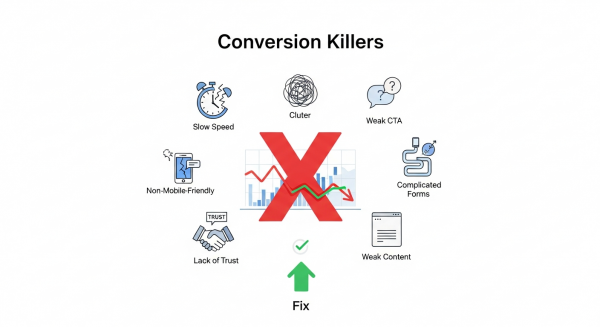
The 7 Website Conversion Killers Costing You Customers (And How to Fix Them)
You’ve invested time, effort, and marketing dollars to drive traffic to your small business website. Visitors are arriving, analytics show the clicks, but there’s a problem: they aren’t taking action. They aren’t buying, signing up, or filling out your contact form. This gap between traffic and action is where conversions die, and it’s a frustration every business owner knows too well.
A “conversion” is simply getting a visitor to complete a desired goal. It could be making a purchase, subscribing to a newsletter, or booking a consultation. Your conversion rate is the single most important metric for measuring your website’s success. If it’s low, it means your online storefront is leaking profits, no matter how much traffic you pour into it.
The good news is that you can plug these leaks. Often, the culprits are common, easily identifiable issues that sabotage the user experience. By understanding these conversion killers and implementing targeted fixes, you can transform your website from a digital brochure into a powerful lead-generation and sales machine. Let’s dive into the seven most common offenders and how to stop them in their tracks.
1. Your Website is Painfully Slow
In the digital age, patience is a scarce resource. If your website takes more than a few seconds to load, your potential customers are gone, likely heading straight to a competitor. According to research cited by Google, the probability of a visitor bouncing increases by 32% as page load time goes from 1 to 3 seconds. A slow website doesn’t just frustrate users; it tells them your business might be outdated or unprofessional. It’s also a critical ranking factor for search engines, meaning a slow site hurts your visibility and your sales.
How to Fix It:
- Optimize Your Images: Large, uncompressed images are the number one cause of slow websites. Use tools like TinyPNG or ImageOptim to shrink file sizes without sacrificing quality. Also, ensure you’re using modern image formats like WebP.
- Invest in Quality Hosting: Cheap, shared hosting can be a bottleneck. Upgrading to a more robust hosting plan or a managed provider can dramatically improve your site speed and reliability.
- Leverage Browser Caching: Caching allows a visitor’s browser to store parts of your site, so it doesn’t have to reload everything on subsequent visits. Most modern platforms have plugins or settings to easily enable this.
- Minimize Code: Bloated themes, excessive plugins, and clunky code can weigh your site down. Regularly audit your tools and scripts, and work with a developer to ensure your code is clean and efficient. You can learn more about Google’s performance standards at their Core Web Vitals documentation.
2. The Design is Cluttered and Confusing
Have you ever landed on a website and felt instantly overwhelmed? A chaotic layout, clashing colors, and too many things competing for your attention create cognitive overload. When a user has to work hard to figure out what to do or where to go, they will simply give up. A clean, intuitive design guides the user on a clear path toward conversion. It builds trust and makes the entire experience feel effortless.
How to Fix It:
- Embrace Whitespace: Don’t be afraid of empty space. Whitespace (or negative space) helps reduce clutter, improves readability, and draws attention to the most important elements on the page, like your call to action.
- Establish a Clear Visual Hierarchy: Use size, color, and placement to guide the user’s eye. Your most important message (your value proposition) should be the most prominent, followed by supporting information and finally, your call to action.
- Stick to One Goal Per Page: Each page on your site should have a single, primary objective. For a product page, the goal is “Add to Cart.” For a landing page, it might be “Download the Ebook.” Focusing on one goal eliminates distraction and increases the likelihood of conversion. Our professional Website Design Services focus on creating clean, conversion-focused layouts that guide users to action.
3. Your Call to Action (CTA) is Weak or Missing
You cannot expect users to read your mind. You have to tell them exactly what you want them to do next. A Call to Action (CTA) is the button or link that prompts this action, such as “Buy Now,” “Sign Up Free,” or “Request a Quote.” A website without clear, compelling CTAs is like a salesperson who never asks for the sale. It’s a dead end for the customer journey.
How to Fix It:
- Use Action-Oriented Language: Start your CTA with a verb. Instead of “Submit” or “Learn More,” try more specific and benefit-driven phrases like “Get Your Free Guide” or “Start My 30-Day Trial.”
- Make It Stand Out: Your CTA button should be impossible to miss. Use a contrasting color that pops against the background, ensure it’s large enough to be easily clicked (especially on mobile), and surround it with a bit of whitespace.
- Strategic Placement: Place your primary CTA “above the fold” so users see it without scrolling. It’s also a best practice to repeat it at the bottom of the page for users who have read all your content and are now ready to act.
4. Your Site Isn’t Mobile-Friendly
More than half of all web traffic now comes from mobile devices. If your website is difficult to navigate on a smartphone—requiring users to pinch, zoom, and scroll horizontally—you are alienating a massive portion of your audience. Google also prioritizes mobile-friendly sites in its search results (a practice called mobile-first indexing). In 2024, a non-responsive website is no longer an option; it’s a critical business liability.
How to Fix It:
- Implement Responsive Design: A responsive website automatically adjusts its layout to fit any screen size, from a large desktop monitor to a small smartphone. This is the modern standard for web development and is essential for a good user experience.
- Test, Test, Test: Don’t just assume your site works on mobile. Use your own phone and ask others to test it on their devices. Navigate through your site, fill out a form, and complete a purchase to identify any friction points. You can use Google’s Mobile-Friendly Test for a quick analysis.
- Think “Thumb-Friendly”: Ensure buttons and links are large enough and have enough space around them to be easily tapped with a thumb. Menus should be simplified for mobile, often using a “hamburger” icon to save space.
5. Your Forms Are Too Long and Complicated
Whether it’s a contact form, a signup form, or a checkout process, every field you add increases friction and lowers the chance of completion. Asking for a user’s life story when all you need is an email address is a surefire way to scare them away. Cart abandonment is a huge issue in e-commerce, and a long, complicated checkout process is a leading cause.
How to Fix It:
- Be a Minimalist: Only ask for the information you absolutely need. Do you really need a phone number for a newsletter signup? Can you get their company name later? Every removed field will boost your completion rate.
- Use Smart Forms: Enable browser autofill to make the process faster. For longer forms, break them into multiple, easy-to-digest steps and show a progress bar so users know how close they are to the end.
- Offer Guest Checkout: Forcing users to create an account before they can make a purchase is a major conversion killer. Always provide a guest checkout option to streamline the buying process. Automating follow-ups and data entry can also streamline your workflow, a key benefit of our AI Automations for Small Business solutions.
6. You Haven’t Built Any Trust
People do business with companies they trust. For a new visitor who has never heard of you, your website has to do all the work of building credibility and reassuring them that you are a legitimate, reliable business. Without trust signals, visitors will feel hesitant to share their personal information or credit card details.
How to Fix It:
- Showcase Social Proof: Prominently display customer testimonials, reviews, case studies, and logos of well-known clients. This shows visitors that other people have trusted you and had a positive experience.
- Display Security Badges: Make sure your site has an SSL certificate (the padlock icon in the browser bar). If you take payments, display the logos of your secure payment processors like Visa, Mastercard, and PayPal.
- Be Transparent: Have a clear and easy-to-find privacy policy, return policy, and contact page with a physical address and phone number. This transparency shows that you are a real business with nothing to hide.
7. Your Content Fails to Connect
Your website copy, product descriptions, and headlines are your digital sales pitch. If the content is vague, full of jargon, or fails to address the visitor’s needs and pain points, it won’t resonate. Great content connects with the user on an emotional level, clearly explains the value you offer, and persuades them that your solution is the right one for them.
How to Fix It:
- Know Your Audience: Before you write a single word, you must understand who you’re talking to. What are their goals? What problems are they trying to solve? Tailor your language and messaging to speak directly to them. This is the foundation of a successful SEO Strategy.
- Focus on Benefits, Not Just Features: A feature is what your product *does*. A benefit is how it makes the customer’s life *better*. Don’t just list specs; explain how your service saves them time, makes them more money, or reduces their stress.
- Write Clear, Compelling Headlines: Your headline is the first—and sometimes only—thing people will read. It must grab their attention and communicate your main value proposition instantly. Ask yourself: if a visitor only read the headline, would they understand what you offer?
Turning Visitors into Valued Customers
Fixing conversion killers isn’t about secret tricks or magic formulas. It’s about viewing your website through your customers’ eyes and removing every point of friction that stands in their way. By focusing on speed, clarity, trust, and a seamless user experience, you can create a digital environment that not only welcomes visitors but also effectively guides them toward becoming loyal customers. Start by auditing your own site against this list—even small, incremental improvements can lead to significant growth in your leads and sales.
If you’re ready to stop losing customers and start maximizing your website’s potential, we can help. Book a free, no-obligation consultation with our expert team to uncover your biggest conversion opportunities today.